Scripts and Code for Let’s Talk Explained

To facilitate the full screen experience a manifest.JSON file was created. This allowed for the application to open without the browser container, once the website is added to the homepage.

{
  "short_name": "Let's Talk ",
  "name": "Let's Talk - Sex Ed for Kids",
  "icons": [
    {
      "src": "logoapp.jpg",
      "sizes": "192x192",
      "type": "image/jpg"
    }
  ],
  "start_url": "/index.html",
  "display": "standalone",
  "orientation": "landscape"
}

The index.html file is displayed when a user isn’t logged in, it consists of a form that facilitates user login into the application. This form links back to a database of users, the only user currently created  demouser and this user must log in with the passcode demouser1. This document links to both my own style in style.css and Font Awesome’s all.css which is where the login person icon and lock icon come from. Font Awesome CDN is a very quick and easy way to insert simple icons onto your webpage. This document then contains a form which links to ‘authenticate.php’, which processes the data gathered by the form. This form requires only two inputs, the username and the password, and the form method POST is used. The submit button has the value of “login”, but it simply submits the data entered into the form to be processed in  ‘authenticate.php’.

<html>
<head>
<meta charset="utf-8">
<title>Login</title>
<link rel="stylesheet" href="https://use.fontawesome.com/releases/v5.7.1/css/all.css">
        <link href="style.css" rel="stylesheet" type="text/css">
</head>
<body id="index">
<div></div>
<div class="login">
<div><img src="assets/logo.png" id="logo" class="logo"></div>
      
<form action="authenticate.php" method="post">
<label for="username">
<i class="fas fa-user"></i>
</label>
<input type="text" name="username" placeholder="Username" id="username" required><br>
<label for="password">
<i class="fas fa-lock"></i>
</label>
<input type="password" name="password" placeholder="Password" id="password" required>
<br>
<input type="submit" value="Login">
</form>
</div>
<div></div>
</body>
</html>

The ‘authenticate.php’ file uses session_start(); to create a session or resumes the current one based on a session identifier passed via the POST request. Next it connects to the database, the below file is connecting to a database on the local host, for security reason to avoid displaying my webdevcit login online. If there is an error with this connection, the process will be stopped and the error message will be displayed. Next this script checks for the data submitted in the form elements, if this data isn’t set an error will display. If neither fields have been filled then  the process will be stopped and the error message ‘You must enter both a username and password’ will display.Next we prepare our SQL statement using bind parameters (s = string, i = int, b = blob,). Bind parameters are a different way to insert data into a database using placeholders like “?”, and although it isn’t necessarily bad to input directly into a database, bind variables are more secure and can be more efficient. We then select the id and the password where the username is equal to ‘s’, the bind parameter string. We then execute the statement and store the result so that we can verify if that account exists in the database. If the username is present in that database we check that the password entered by the user corresponds with the one stored  in the database. If they correspond the user is now logged in so we create a session to remember data on the server across pages and bring them to the home.php page. If the password isn’t correct a password error is displayed, if the username isn’t present on the database a username error is displayed. This is an example of nested if statements. This php file has been adapted from a tutorial by David Adams on login systems.(2019)

<?php
session_start();
$DATABASE_HOST = 'localhost';
$DATABASE_USER = 'root';
$DATABASE_PASS = '123';
$DATABASE_NAME = 'phplogin';
$con = mysqli_connect($DATABASE_HOST, $DATABASE_USER, $DATABASE_PASS, $DATABASE_NAME);
if ( mysqli_connect_errno() ) {
		die ('Failed to connect to MySQL: ' . mysqli_connect_error());
}
if ( !isset($_POST['username'], $_POST['password']) ) {
	die ('You must enter both a username and password');
}
if ($stmt = $con->prepare('SELECT id, password FROM accounts WHERE username = ?')) {
	$stmt->bind_param('s', $_POST['username']);
	$stmt->execute();
	$stmt->store_result();
    if ($stmt->num_rows > 0) {
	$stmt->bind_result($id, $password);
	$stmt->fetch();
	if ($_POST['password'] === $password) {
		session_regenerate_id();
		$_SESSION['loggedin'] = TRUE;
		$_SESSION['name'] = $_POST['username'];
		$_SESSION['id'] = $id;
		header('Location: home.php');
	} else {
		echo 'Incorrect password!';
	}
} else {
	echo 'Incorrect username!';
}
$stmt->close();
}

The Home.php file begins with a session start(); as we need to use sessions, we must then check if the user is logged in and if the are not we force them back to the login page. The rest of this page is relatively straightforward, grids are used to style the page with a sidecar, which contains the logout and display profile buttons. At the time of writing this blog post the final version of this screen has not been completed, yet all the fundamental elements of functionality are present. <?=$_SESSION[‘name’]?> gets the name of the user from the database and allows for the home screen to be customised for the user that is currently logged in.  

<?php
session_start();
if (!isset($_SESSION['loggedin'])) {
	header('Location: index.html');
	exit();
}
?>
<!DOCTYPE html>
<html>
<head>
<meta charset="utf-8">
<title>Home Page</title>
<link href="style.css" rel="stylesheet" type="text/css">
<link rel="stylesheet" href="https://use.fontawesome.com/releases/v5.7.1/css/all.css">
</head>
<body class="loggedin">
 <div><img src="assets/logo.png" id="logoheader"></div>
        <nav class="navtop">
		<div class="side">
   <div class="profile1"><a class='profile'href="profile.php"><i class="fas fa-user-circle"></i>Profile</a></div><div></div>
<div class="logout1"><a class='logout'href="logout.php"><i class="fas fa-sign-out-alt"></i>Logout</a></div>
		</div></nav>
        
<div class="content">
			<p>Welcome back, <?=$_SESSION['name']?>!</p>
<div class="newuser">  New Here ? <a href="puberty.html">Begin Journey</a> </div></div>
</body></html>

The Profile page connects to the database and reproduces the users information onto the page. We begin this file by starting a session and redirecting logged out users to the index page. We then connect to the database in the same way we did in ‘authenticate.php’. This page is styled using the same grid technique as was used in home.php. At the time of this blog post, this page also had not been completed. Initially, it had been thought that another table in the database would be used to gather users scores and track their progression through the application. However, as there is at present only one possible user for the application because it is a prototype, it was decided that local storage would be an appropriate way to track the users progression through the application. This page shows example of retrieving data from both the database and local storage. Below, profile information is retrieved using  the database, the user id is used here to select data from the database. This data is then displayed using <?=$_SESSION[‘name’]?>,<?=$email?>,<?=$password?>.Local storage is used to gather results from the various quizzes in the application, here an onload event triggers a function called scoreMe(); which checks for a score saved in local storage and gives feedback based on this score. This will be further developed to display medals and rewards based on scores achieved in tests, all the basic principles of this are evident from the below code.

<?php
<!--------PHP--------!>
session_start();
if (!isset($_SESSION['loggedin'])) {
	header('Location: index.html');
	exit();
}
$DATABASE_HOST = 'localhost';
$DATABASE_USER = 'root';
$DATABASE_PASS = '123';
$DATABASE_NAME = 'phplogin';
$con = mysqli_connect($DATABASE_HOST, $DATABASE_USER, $DATABASE_PASS, $DATABASE_NAME);
if (mysqli_connect_errno()) {
	die ('Failed to connect to MySQL: ' . mysqli_connect_error());
}
$stmt = $con->prepare('SELECT password, email FROM accounts WHERE id = ?');
$stmt->bind_param('s', $_SESSION['id']);
$stmt->execute();
$stmt->bind_result($password, $email);
$stmt->fetch();
$stmt->close();
?>
<!DOCTYPE html>
<html>
	<head>
		<meta charset="utf-8">
		<title>Profile Page</title>
		<link href="style.css" rel="stylesheet" type="text/css">
		<link rel="stylesheet" href="https://use.fontawesome.com/releases/v5.7.1/css/all.css">
	</head>
	<body class="loggedin">
         <div><a href="home.php"><img src="assets/logo.png" id="logoheader"></a></div>
		<nav class="navtop">
			<div class="side">
                <div class="profile1"><a class='profile'href="profile.php"><i class="fas fa-user-circle"></i>Profile</a></div>
                <div></div>
				<div class="logout1"><a class='logout'href="logout.php"><i class="fas fa-sign-out-alt"></i>Logout</a></div>
			</div>
		</nav>
        <script>
    
function scoreMe(){
var periodscore = localStorage.periodScore;
document.getElementById("periodscore").innerHTML= periodscore;
var perscore = document.getElementById("periodscore").innerHTML;
//console.log(periodscore);}
// var score = localStorage.getItem('myScore');
if( perscore == "undefined"){console.log("Test Not Taken");}
else if( perscore <= "3"){console.log("You Failed");}
else if( perscore == "4"){console.log("You Passed");
                         document.getElementById("periodsmedal").style.display=("block")
                         document.getElementById("periodsmedal").style.innerHTML=("You Passed")}
}
            
 function load() {
        console.log("load event detected!");
        scoreMe();
      }
      window.onload = load;
        </script>
<!--------CSS--------!>
<style>#periodsmedal{
border: 2px solid red;
display: none;
}</style>
<!--------HTML---------!>
<html>
<div id="periods">
<div id="periodsmedal">YAY</div>
<div id="periodscore"></div>
</div>
</html>
        
		<div class="details">
			<h2>Profile Page</h2>
			<div>
				<p>Your account details are below:</p>
				<table>
					<tr>
						<td>Username:</td>
						<td><?=$_SESSION['name']?></td>
					</tr>
					<tr>
						<td>Password:</td>
						<td><?=$password?></td>
					</tr>
					<tr>
						<td>Email:</td>
						<td><?=$email?></td>
					</tr>
				</table>
			</div>
		</div>
	</body>
</html>

This is the script that supports the book pages in the application, an example of which is shown below

The below functions support the audio, at this point in development only one voiceover was created, once the others have been created an array will be used to store the different audio for every page. When the book button is pressed, the page reads the audio. The onlaod function plays he background music on loop once the window is loaded

var readme = new Audio();
readme.src = "assets/voiceover.mp3";
 
 
window.onload = function() {
    document.getElementById("assets/my_audio").play();
}

The below function allows the text div to expand and retract. After user testing this function will be altered so that the div is expanded by default as opposed to retracted by default. This function works using the grid template column style to effect the portion of the screen that is taken up by the text div. The function stores the “container” div, which is the ones that contains the text, as variable y. The function then calls and if function that retracts the div if it;s expanded and expands it if its retracted.

function readMe(){
     var y = document.getElementById("container");
if(y.style.gridTemplateColumns == '4fr 7fr 1fr 0fr'){y.style.gridTemplateColumns = '1fr 10fr 1fr 0fr';
document.getElementById("view").style.display = "none";}
    else{y.style.gridTemplateColumns = '4fr 7fr 1fr 0fr'; 
    document.getElementById("view").style.display = "block";}
}
 
 
function Menu(){
    var x = document.getElementById("hiddenbuttons");
   if( x.style.display == "block"){ 
       x.style.display = "none";
  } else {
    x.style.display = "block";
  }
}
 

The menu button works in a similar way. By storing the hidden buttons div as a variable x, it when uses an if statement to hide them if they are displayed and display them if the are hidden.

Both these functions utilize if statements to allow the buttons to both complete and reverse a function

Functions for individual framework pages

Below are an example of some of the functions contained in framework.js that are called by specific framework pages only. These functions effects animations, styles or inner html of the pages to which they are associated. They all support the functionality in the center image elements of the pages.

function sun(){
if(document.getElementById("sun").style.top = "300px"){document.getElementById("sun").style.top = "100px";document.getElementById("sun").style.transitionDuration = "1s";}
else{
document.getElementById("sun").style.top = "300px"; }
}
 
function circle(){
document.getElementById("circle").style.display= "block";
}
function egg(){
document.getElementById("egg").style.animationName="egg";
}
function blood(){
document.getElementById("egg").style.animationName="blood";
document.getElementById("blood").style.animationName="blood";
}
function pad(){
document.getElementById("info").style.display="block";
document.getElementById("infop").innerHTML="Used by placing the pad on the inside of your underwear where it can absorb the menstrual fluid as it leaves the vagina.Pads come in all shapes and sizes to fit you.Each pad should only be used once and should be changed at least every 4 hours.When you are finished using a pad, you need to wrap it up in tissue and throw it in the bin – never flush them down the toilet.";
 document.getElementById("infohead").innerHTML="Pads";
}
function tampon(){
document.getElementById("info").style.display="block";
document.getElementById("infop").innerHTML="Tampons are for inside the body and are inserted into the vagina. They absorb menstrual fluid as it is being released before it leaves the vagina.  Each tampon must only be used once and changed every 4-6 hours or sooner if it is full. Some tampons come with applicators and some do not. Pick the one you feel most comfortable using. They also come in different sizes. If it’s your first period you may want to use slim or a thin tampon.";
 document.getElementById("infohead").innerHTML="Tampons";
}
function menstrual(){
document.getElementById("info").style.display="block";
document.getElementById("infop").innerHTML="menstrual cups are for inside the body and are inserted into the vagina. Instructions with on the box will explain how to insert the cup. Cups do not come with an applicator, you will need to be comfortable touching your vagina to insert and remove the cup. Cups must be changed and cleaned every 12 hours and are reusable for up to a year. ";
 document.getElementById("infohead").innerHTML="Menstrual Cup";
}
function hideInfo(){
document.getElementById("info").style.display="none";
}
function help(){
document.getElementById("help").animationName="bounceIn";
}

There were quizzes implemented in the application to test user understanding of the covered topics. These were  facilitated using arrays which stored various questions and multiple choice answers, there were then displayed using javascript. When the quiz had been scored we added the score to local storage so it could be retrieved on the profile page. These pages all stored results to a different local storage variable. These quizzes were adapted from previous assignments and online tutorials . Below is the Javascript for one of the quizes

function Question(text, choices, answer) {
    this.text = text;
    this.choices = choices;
    this.answer = answer;
}
 
Question.prototype.isCorrectAnswer = function(choice) {
    return this.answer === choice;
}
 
function Quiz(questions) {
    this.score = 0;
    this.questions = questions;
    this.questionIndex = 0;
}
 
Quiz.prototype.getQuestionIndex = function() {
    return this.questions[this.questionIndex];
}
 
Quiz.prototype.guess = function(answer) {
    if(this.getQuestionIndex().isCorrectAnswer(answer)) {
        this.score++;
    }
 
    this.questionIndex++;
}
 
Quiz.prototype.isEnded = function() {
    return this.questionIndex === this.questions.length;
}
 
function populate() {
    if(quiz.isEnded()) {
        showScores();
    }
    else {   
        // show options
        var choices = quiz.getQuestionIndex().choices;
        for(var i = 0; i < choices.length; i++) {
            var element = document.getElementById("choice" + i);
            element.innerHTML = choices[i];
            guess("btn" + i, choices[i]);
        }
 
        showProgress();
    }
};
 
function guess(id, guess) {
    var button = document.getElementById(id);
    button.onclick = function() {
        quiz.guess(guess);
        populate();
    }
};
 
 
function showProgress() {
    var currentQuestionNumber = quiz.questionIndex + 1;
    var element = document.getElementById("progress");
    element.innerHTML = "Question " + currentQuestionNumber + " of " + quiz.questions.length;
    console.log(currentQuestionNumber);
        if (currentQuestionNumber == 1){
            console.log("hello");
            document.getElementById("arrow1").style.display = "block";
            document.getElementById("arrow2").style.display = "none";
            }
        else if (currentQuestionNumber == 2){
            document.getElementById("arrow2").style.display = "block";
            document.getElementById("arrow1").style.display = "none";
        }
};
 
 
function showScores() {
 
    document.getElementById("arrow1").style.display = "none";
    document.getElementById("arrow2").style.display = "none";
    document.getElementById("result").style.display = "block";
    console.log(quiz.score);
 localStorage.femanatomyScore = quiz.score;
    document.getElementById("resultheader").innerHTML = 'You got <b>' + quiz.score + '/' + questions.length + '</b> questions correct.';
};
 
// create questions
var questions = [
    new Question("", ["Ovary", "Fallopian Tube","Uterus"], "Ovary"),
    new Question("", ["Ovary", "Fallopian Tube", "Uterus"], "Uterus"),
 
];
 
// create quiz
var quiz = new Quiz(questions);
 
// display quiz
populate();

Here is the html associated with the above quiz,

/style>
</head>
<body>
    <div class="grid">
        <div id="quiz">
            <h1>What is this body part called ?</h1>
     
            <div class="buttons">
                <button id="btn0"><span id="choice0"></span></button>
                <button id="btn1"><span id="choice1"></span></button>
                <button id="btn2"><span id="choice2"></span></button>
 
            </div>
            <footer>
                <p id="progress">Question x of y</p>
            </footer>
        </div>
    </div>
    <img src="assets/arrow.png" id="arrow1">
    <img src="assets/arrow.png" id="arrow2">
<div id="result"><p id="resultheader"></p></div>
 
<script src="labelquiz.js"></script>
</body>
</html>

References

Adams, D (2019), ‘Secure Login System with PHP and MySQL’, CodeShack.io, accessed 04/05/2019 via <https://codeshack.io/secure-login-system-php-mysql/>.

Lauren@phantomesse (n.d) ‘Multiple CHoice Quiz’, CodePen accessed 10/04/2019 via <https://codepen.io/phantomesse/pen/YPrqLJ/>.


Hansan,M (2018) ‘Making a multiple choice quiz using javascript arrays’ Youtube accessed 10/04/2019 via <https://www.youtube.com/watch?v=3hu5n3xHsnw&t=252s

Think Aloud Protocol User Testing – Findings and Solutions

Think Aloud Protocols are designed to highlight the strengths and weaknesses in a system by encouraging participants to voice their thoughts as they navigate through the system. After conducting a think aloud experiment with four participants, there were elements of our system that caused confusion amongst multiple participants. These elements of our UI may not be designed in the best possible way to ensure a positive user experience. The aim of these experiments was to discover what elements of our system need to be redesigned so that we can offer the best user experience possible and ensure navigation through our application is easy for the user.

There were a few elements of our interface that caused participants difficulty, one of which was the select character screen. One user attempted to press the characters name as opposed to her avatar in order to select the character. This caused confusion as the interface did not react to this interaction. This is a simple design flaw and can be easily fixed by adding a link to the characters name, that way either the avatar or character name will allow the user to progress to the next screen.

A prominent issue that occurred during the experiments was users overlooking the read button that displays the informational text, a few participants had navigated through a few screens before they realised that the button was important to gain the information and put the imagery into context. As a default we had designed the application so that the text div was collapsed, and muted. To fix this design issue the read button will by default have the text on-screen and the button can then collapse it. The voiceover will also play automatically. These design changes will ensure that users are aware of the information text from the beginning as it is of huge importance within the app.

For one participant it took a few screens until they realised there was an interaction when they tapped the image on every page. The user did not press the image and see that they could interact with it, they were a few pages in before they realised that was an option. To fix this issue on the first page with an interaction, the informational text will instruct users to interact with the imagery on screen. Any interactions or animations that can be played on loop to add interest to the imagery should also play without a trigger. This will allow for the screen to seem more interactive and less static.

The final issue that occured with participants was confusion between the ovulation and menstruation screens, as the imagery is similar aside from the position of the egg on screen, one user initially navigated past the second screen assuming it was the same as the first. To solve this issue the background colour on the second screen will be changes so that it is different from that on the first. This will ensure that it is obvious to users that the screens are different. Going forward we will also ensure that all consecutive screens have different background colors.

Think Aloud Protocol – User Testing Study Design


To test the UX of our application a think aloud protocol was completed, concerning the prototyped section of the application. Participants were asked to complete the tasks below using the application provided to them on our tablet, and think aloud as they are doing so.

Why Think Aloud ?

“Think Aloud (TA) studies provide rich verbal data about reasoning during a problem solving task. Using TA and Protocol analysis, investigators can identify the information that is concentrated on during problem solving and how that information is used to facilitate problem resolution.” (E. Fonteyn, Marsha & Kuipers, Benjamin & Grobe, Susan. 1993). This method involves providing participants with a task and asking them to think aloud as they attempt to complete the task. Participants verbalize their thought patterns as they navigate through the system, and from this we gain an insight into what a user who is unfamiliar with the system experiences when the interact with our UI. The reason this is important is because as designers we have become familiar with the system we are developing and we may often overlook details that may cause confusion to our users. “With the rise of cognitive psychology over the past 30 years, thinking aloud has again become a standard method for studying human thought.  The conditions under which it provides access to silent thoughts are now believed to be well understood..” (Dumas, Joseph 2001).

The purpose of this think aloud study for us was to gain an understanding into how the developed UI is interacted with by users. The aim was to gauge what elements of the application may cause individuals confusion, were users able to navigate through the system, and what elements of the system did people think were effective. We completed this study on four participants, notes were taken while each person completed the task and a screen recording was also captured to record the users movements through the system.

The Study Design

Research Methodology : This study takes a qualitative approach and aims to gather rich data about ‘Let’s Talk’ prototype through the use of think aloud protocol. Participants will be asked to complete a series of tasks with the Let’s Talk Prototype and think aloud as they attempt to complete these tasks.

Methods : Think Aloud Protocol, this allows researcher to gather rich verbal data on a users thought process during the completion of a set of tasks.

Location: The location of this study will be in an environment that is private and comfortable for the individual participants, be it their own home or a classroom, where they can speak freely without fear of being overheard. The task will be completed on a Alba Nou Tablet, provided by the researcher.  

Participants:

Population:  We will be focusing this study on people above the age of 18 due to the sensitive content in the application

Sample Size: As Think Aloud Protocol will provide us with rich qualitative data we conducted this study with a sample size of 4 participants.The participants may have a range of technical abilities, ages and genders.

Study Procedure : Participants will be asked to complete a set of tasks using the ‘Let’s Talk’ application prototype and think aloud while they are doing so.

Please complete the tasks below and think aloud as you are doing so..

  1. Open Let’s Talk Application
  2. Login Using these details….

Username: username

Password: passcode

  1. Select Rosin as your Character
  2. Navigate through the application until you reach the section on period pain

Data gathering : Notepad and paper to take notes of what participant is saying and a screencast to record their movements on the application interface

What was gathered ?

Screencasts :https://photos.app.goo.gl/ULiYdgd5D9gACPcQ6ts

Notes: (See Blogpost on Data Analysis)

References

Dumas, Joseph. (2001). Usability testing methods: Think-aloud protocols. 22/04/2019 via URL https://www.researchgate.net/publication/319130250_Usability_testing_methods_Think-aloud_protocols

E. Fonteyn, Marsha & Kuipers, Benjamin & Grobe, Susan. (1993). A Description of Think Aloud Method and Protocol Analysis. Qualitative Health Research – QUAL HEALTH RES. 3. 430-441. 10.1177/104973239300300403, accessed  22/04/2019 via URL https://www.researchgate.net/publication/249674934_A_Description_of_Think_Aloud_Method_and_Protocol_Analysis

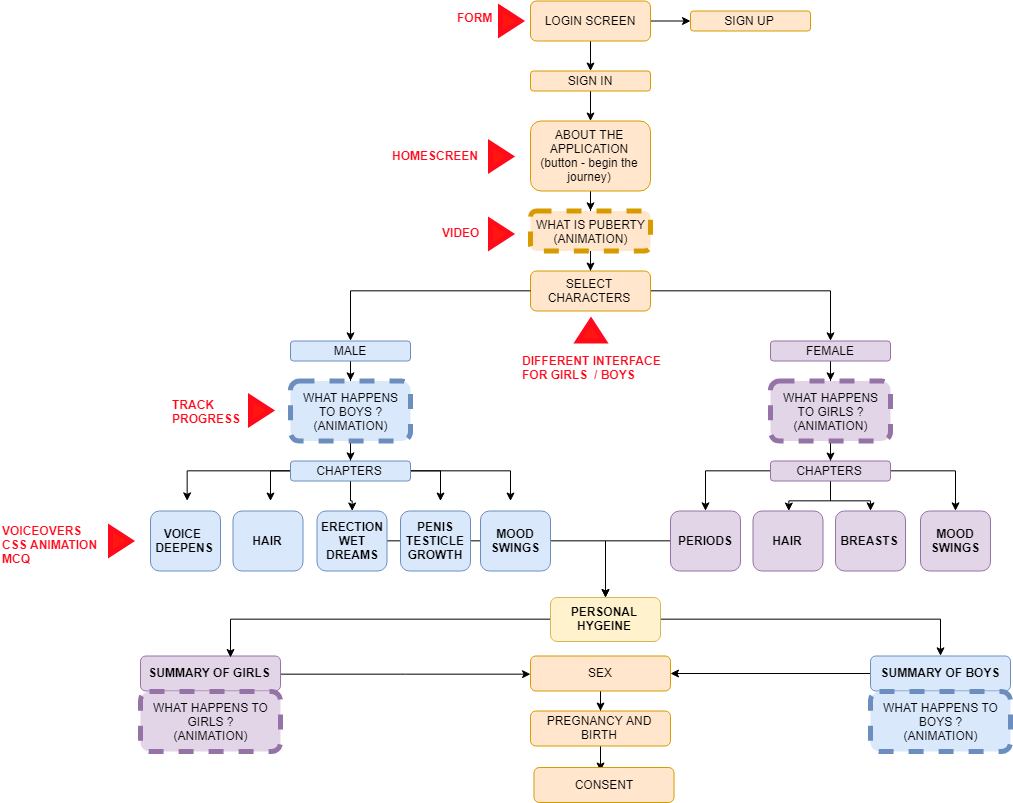
Flowchart and System Interaction

To properly determine the points of interaction within the system it was necessary to examine the system as a whole. By analyzing the system as a whole, it is possible to understand the areas of the application that will require user interaction, and define these points. A flowchart was created to represent the pages in the application. This will be useful during the development of the application as it will allow recognition of parts of the system that will be reuable and parts of the system that require unique scripts.

Progressive Web Applications


‘Progressive App design offers us a way to build better experiences across devices and contexts within a single codebase’ (Russel 2015). Progressive Web Applications involves using web development technology to create applications that can run smoothly on multiple platforms and devices without having to make a specific application for each individual platform.

Progressive Web Apps are experiences that combine the best of the web and the best of apps. They are useful to users from the very first visit in a browser tab, no install required. As the user progressively builds a relationship with the app over time, it becomes more and more powerful. It loads quickly, even on flaky networks, sends relevant push notifications, has an icon on the home screen, and loads as a top-level, full screen experience.’ (Your First Progressive Web App. n.d.) They way we use mobile devices compared to desktop devices is quite different, apps are at the center of mobile activity as opposed to on desktop where a large component of our activities take place online.

An example used by Alex Russell, a google chrome engineer, at the 2016 Progressive Web App Summit, was google maps. After a show of hands he observed , not to his surprise, that most people navigated to google maps through the web on their desktop computers, but when asked the same question about mobile, most people put their hands down. If you were to get to google maps on your phone you would more than likely do it via their app. “We don’t really use the web on mobile the way we do on desktop, but remember we started with native apps on desktop too.” (Russell 2016).

People gravitate towards native apps because of their speed, reliability and immersive experience. However in the last few years web technology has developed so that we can achieve a similar speed, reliability and experience as native technology. PWA’s encompass mobile(or desktop) websites that can act and react like native apps, providing offline service, fast interactions and immersive full screen experiences.

“Progressive Web Apps are user experiences that have the reach of the web, and are:

  • Reliable – Load instantly and never show the downasaur, even in uncertain network conditions.
  • Fast – Respond quickly to user interactions with silky smooth animations and no janky scrolling.
  • Engaging – Feel like a natural app on the device, with an immersive user experience.

This new level of quality allows Progressive Web Apps to earn a place on the user’s home screen.” (Progressive Web Apps, n.d.)

Unlike native applications, which require downloading via that app store, Progressive Web Applications “While a PWA can be treated like a standard application on a device, the ability for it to be run from a uniform resource locator (URL) makes it easy to use the application on any device with a browser.”

App Shell Model

“An application shell is the minimal HTML, CSS, and JavaScript powering a user interface. The application shell should:

  • load fast
  • be cached
  • dynamically display content

An application shell is the secret to reliably good performance. Think of your app’s shell like the bundle of code you’d publish to an app store if you were building a native app. It’s the load needed to get off the ground, but might not be the whole story. It keeps your UI local and pulls in content dynamically through an API.”(Gaunt, M. Osmai, A.  2019)

The App Shell Model is different for every Progressive Web Application. Google developer provides a codelab on Progressive Web Apps (Progressive Web Apps, n.d.), this lab provides a guideline set of questions one should ask themselves when designing their app shell model.

  1. What needs to be on the screen immediately ?

On screen immediately, we need the login screen, after this, we will need to go to the “What is Puberty ?” page after which the character will be selected and the diary page can be shown. If they are logging back in it will them straight to the diary page

  1. What other UI elements are key to our app ?

The forward and back arrows to navigate through the pages.A loading gif for content that is downloading or has not yet been downloaded.

  1. What supporting resources are needed for the app shell ?

The background images, button images and a loading gif.

Service Workers

Service workers are Progressive Web Applications solution to offline functionality, they cache previous loads of the application shell and use this when the network isn’t available. Normally if connection fails on a web page, you don’t see any content or you get the offline dino game on screen. Progressive web apps show you shell of the web application even if the content on the page will not be loaded until the connection is established again. This provides users with an experience that more closely emulates that of a native application.  “A service worker is a script that runs in the background, separate from your web page. It responds to events, including network requests made from pages it serves and push notices from your server. A service worker has an intentionally short lifetime. It wakes up when it gets an event and runs only as long as it needs to process it.” (Gaunt, M. Osmai, A. 2019) Essentially, once a user loads the application once the application shell is cached. Once the user reopens the same application, the service worker grabs the application shell from the cache which is stored locally on the device. This not only allows for the application shell to be accessed when the device is offline, it allows for faster loading times than if the application shell was to be downloaded from the network on every single load.

“With offline first we assume of line, and do as much as we can with local content, the try and get content from the network, and the more we get to render without a connection, the better. So you should think of the network as a piece of progressive enhancement, an enhancement that may not be there” (Archibald, J. 2016) Service workers are made using Javascript, and the act as a buffer between the page and the network. Usually page request go straight to the network and the network send things back to the page directly. A service worker is placed between the network and the page so requests from the page must first go through the service worker before they reach the network.

The Application Shell will always be cached locally, because no matter how fast your connection, it will be much faster to retrieve the application shell from the devices cache. This is done using an install event which is triggered when the browser reads the service worker initially. This will not happen by default, and so you must add it to the fetch event, this will then check that if the url is the homepage and if the statement rings true, the application shell will be added to the cache. We then set up the network as a fallback for this request, so that if the data required isn’t available in the cache the page then requests it from the network. “The network only matters to fetch new data, and that’s the offline first goal” (Archibald, J. 2016)

Bibliography

Archbald, Jake 2016 Instant Loading Offline First (Progressive Web App Summit), Google Chrome Developers, viewed on 22/03/2019

Bob Frankston, March 2018, Progressive Web Applications, IEEE Consumer Electronics Magazine, accessed on 21/03/2019 via https://ieeexplore-ieee-org.cit.idm.oclc.org/stamp/stamp.jsp?tp=&arnumber=8287006

Gaunt, M. Osmai, A.  February 2019, Instant Loading Web Apps with an Application Shell Architecture, Google Developer, accessed on 22/03/2019 via https://developers.google.com/web/updates/2015/11/app-shell

Progressive Web Apps, n.d. Google Developer, accessed on 21/03/2019 : https://developers.google.com/web/progressive-web-apps/

Russel, Alex June 15th 2015, “Progressive Web Apps, Escaping Tabs Without Losing Our Souls”, ‘Infrequently Noted’, blog post. Viewed on 21/03/2019 at URL : https://infrequently.org/2015/06/progressive-apps-escaping-tabs-without-losing-our-soul/

Russell, Alex 2016, Opening Keynote (Progressive Web App Summit 2016), Google Chrome Developers, viewed on 21/03/2019 https://www.youtube.com/watch?v=9Jef9IluQw0&index=3&list=PLNYkxOF6rcIAWWNR_Q6eLPhsyx6VvYjVb
Your First Progressive Web App, n.d., Google Developer – Code Lab accessed on 21/03/2019 via https://codelabs.developers.google.com/codelabs/your-first-pwapp/#0

Web Apps

As the PhoneGap Developers App isn’t availible on iOS decided and was incompatible with the tablet I had due to it having the wrong version of android OS I decided to buy a new tablet that had the correct version of android. PhoneGap requires version 5.0 and above so I purchased a tablet that uses version 9.0 and the app was still incompatible with my device. I then decided to downlod the adk of PhoneGapDeveloper, which I was able to install and run but it did’t connect to the applications I was attempting to test on my deskop. This was frustrating, but I figured out after some research on message boards about the application that there is a long list of requirements for devices to be compatible with PhoneGap Developer.

API Levels Supported

  • 15+

Hardware Requirements

  • android.hardware.BLUETOOTH
  • android.hardware.CAMERA
  • android.hardware.LOCATION
  • android.hardware.location.GPS
  • android.hardware.location.NETWORK
  • android.hardware.MICROPHONE
  • android.hardware.screen.LANDSCAPE
  • android.hardware.sensor.ACCELEROMETER
  • android.hardware.sensor.COMPASS
  • android.hardware.TOUCHSCREEN
  • android.hardware.WIFI

Permissions Required

  • android.permission.ACCESS_COARSE_LOCATION
  • android.permission.ACCESS_FINE_LOCATION
  • android.permission.ACCESS_GPS
  • android.permission.ACCESS_LOCATION_EXTRA_COMMANDS
  • android.permission.ACCESS_NETWORK_STATE
  • android.permission.ACCESS_WIFI_STATE
  • android.permission.BLUETOOTH
  • android.permission.BLUETOOTH_ADMIN
  • android.permission.CAMERA
  • android.permission.GET_ACCOUNTS
  • android.permission.INTERNET
  • android.permission.MODIFY_AUDIO_SETTINGS
  • android.permission.READ_CONTACTS
  • android.permission.READ_EXTERNAL_STORAGE
  • android.permission.READ_PHONE_STATE
  • android.permission.RECORD_AUDIO
  • android.permission.RECORD_VIDEO
  • android.permission.VIBRATE
  • android.permission.WAKE_LOCK
  • android.permission.WRITE_CONTACTS
  • android.permission.WRITE_EXTERNAL_STORAGE
  • com.google.android.c2dm.permission.RECEIVE  (Pindoria, Suraj 2016)

I brought this issue to my coding lecturer and he suggested I develop the applications as a web application, which is what I would be doing with PhoneGap anyways. I could then test the application on the device using our college webserver (webdevcit.com). I can get javascript plugins that allow me to make the application full screen and allow me interactivity such as swiping (jquery gestures). I can still then transfer the app files into phonegap and export the application from there at the end of the project, I would just be cutting out the middleman during the development phase.

Making Web Applications Fullscreen

There are several easy ways to make a website fullscreen, you can request the browser to go full screen in response to a user gesture, you app download the website to the homepage, or you can auto hide the address bar. ( Making Fullscreen Experiences, 2019)

How I did this

  1. First I created a HTML and CSS file for the homepage
  2. I added this meta tag to the header of the HTML <link rel=”manifest” href=”/manifest.json”>
  3. I then created a JSON file containing this code
  4. I transferred all the files to the server and opened the web page in the browser. I then from the page settings added the website to the homepage
  5. I opened the application from my homescreen
  6. The Website is now Fullscreen

Drag and Drop Touch Events

On a mobile device there is not mouse, touch events must be used instead. There are plugins available for more complex gestures, but this is how I created a simple drag and drop touch event.

  1. Create HTML Element you want to move and give it an id
  2. Create an onload function, store the HTML element in a variable
  3. Add a touchmove event listener to this variable that triggers another function
  4. Prevent the default movements when the event is triggered
  5. Create a variable that stores the new touch location and use this to change the style of the HTML element.

Current Academic Paper

References

Pindoria, Suraj (2016, July 27) Current Software, Hardware, and Permissions Required.[online from comment] message posted to https://github.com/phonegap/phonegap-app-developer/issues/408#issuecomment-235703076

Making Full Screen Experiences, 2019 , Google Developer, viewed 11 March 2019, via https://developers.google.com/web/fundamentals/native-hardware/fullscreen/

Phone Gap – Features and Functionality Notes

In my last post I detailed the process I went through to come to a decision on what method I would use to develop our application ( post here ). I came to the conclusion that using PhoneGap would be the best fit for our particular project.

So, what is PhoneGap ?

“PhoneGap is an application framework that enables you to build native applications using HTML and JavaScript. Think of PhoneGap as a webview container that is 100% width and 100% height, with a JavaScript programming interface that allows you to access operating system features.” (Natili, Giorgio 2013).

In essence PhoneGap allows you to use web development languages HTML, CSS and JavaScript, to develop and test mobile applications for both Android and iOS. PhoneGap is “an open source, cross-platform framework for developing mobile applications. PhoneGap allows developers to leverage web development skills— HTML, CSS, and JavaScript— to developed native applications for iOS, Android, BlackBerry, and many other platforms with a single codebase.” ( Lunny, Andrew 2011)

What kind of Applications can you create using PhoneGap ?

There are three main types of applications available, native apps, web apps and hybrid apps. There are advantages and disadvantages to each method of application development. Native apps are made specifically for the OS they are intended for. Native applications can store more data offline and have more access to the devices hardware and OS features. These apps are more costly because they have to be coded in the language corresponding to each specific platform.

Web Apps can be developed using one common language for all platforms, however they have limited functionality and access to the devices OS. “Web apps are built using web standards, so it’s possible to have a common code base for all the supported devices and it’s much easier to find developers with the appropriate skills. On the con side, a web app is not able to access the entire device’s hardware and OS features and is not installed on the user device, which means that users cannot access it when the device is not online.”(Natili, Giorgio 2013).

Hybrid applications are a mixture of web apps and native applications. “A hybrid app can be viewed like a web app on steroids; in fact it uses web standards and can access most of the device’s hardware and OS features”(Natili, Giorgio 2013).

Beginning in PhoneGap

Using PhoneGap it is possible to build the core functionality of the application testing on a desktop browser before moving onto a native project. You can also use the PhoneGap developers application to test your application on the actual device (this is only currently available for android development as the application was recently removed from the app store).To begin a project you simply open up the PhoneGap desktop application and start a new blank document. You are required to place the new application into a folder and name it. It is also recommended you give the application an ID in the form of a backwards URL.

Scaling UI images based on Pixel Density

  1. Create a css class for the images you wish to scale <img class=’highres’ />
  2. Create a script able to get all the images marked with the previously defined class and change their width according to the pixel ratio. function processImages() { var pixelRatio = window.devicePixelRatio; if(window.devicePixelRatio > 1) {   var matches = document.querySelectorAll(“img.highRes”); for(var i = 0; i < matches.length; i++) { matches[i].width = (matches[i].width / pixelRatio); } }
  3. Run the script when the page is loaded or when the deviceready event is fired. When using PhoneGap, it is strongly recommended that the code that needs to run at startup is executed immediately after the deviceready event.

addEventListener(‘deviceready’, onDeviceReady);

function onDeviceReady(evt){ processImages(); }

(Natili, Giorgio 2013)

Page 186 of PhoneGap Beginner’s Guide by Giorgio Natili has a list of all the common API plugins available.

Accessing Device Sensors

“The use of sensors opens the doors to sophisticated apps, able to improve the user experience and enhance the capabilities of a modern app” ( Natili, Giorgio 2013) Most mobile devices have sensors that sense touch, geolocation, orientation and motion. These sensors are generally composed of an accelerometer, gyroscope, compass, barometer, and orientation sensor. understanding how these sensors work is an important step o understanding how to use them.

Accelerometer : Generally made up of three accelerometers, one on each axis (x, y, z), that measure the changes in velocity

Gyroscope : Measures the rate of rotation around the axes pitch, roll and yaw.(y, x, z).

Magnetometer : Measures the strength of magnetic fields around the device, this is how the phone determines its position in relation to the geomagnetic north pole.

Location Capabilities

Determined by position sensors

  • GPS
  • APS
  • Cell Tower Triangulation
  • Wifi Triangulation
  • IP Address

Orientation Changes

Device User GestureEvents FiredOrientation
Ipad to Landscaperesize0
orientation90
Ipad to Portraitresize90
orientation0
Android to Landscaperesize 90
orientation90
Android to Portraitresize0
orientation0

Current Academic Paper

Bibliography

Natili, G 2013, PhoneGap Beginner’s Guide, Packt Publishing Ltd, Birmingham. Available from: ProQuest Ebook Central. [1 March 2019].

Lunny, Andrew. PhoneGap Beginner’s Guide, Packt Publishing Ltd, 2011. Available from: ProQuest Ebook Central. [1 March 2019].

Interaction in Our Application : Competitor Analysis


To get a sense of what types of interaction will be used in our application, competitor analysis of interactions in other storybook applications was completed. By analysing the interaction in other applications it will not only give me inspiration for the interaction in our application, it will also give me an idea of how this interaction could be facilitated. This post will detail the findings of my analysis of the interactivity of applications including : The Wizard of Oz, Cinderella and Dear Diary.

The Wizard of Oz

This application by Tabtale opens on a home screen that allows you choose whether you read the story or play a paint style game. The home screen gives an option for parents, which gives them information about the application, this is a helpful feature. The story itself comprises of screen and and illustration with a looped animation on the screen. The voiceover of the story is automatically read out the text can not be seen on screen, this would be a disadvantage. The storybook has interactions within the illustration, such as for example you can turn on and off a lightbulb.

Dear Diary

This application allows users to read the diary of a teenage girl, each entry describes different days of her life, as you read you are given option to choose from that will influence the story going forward. There is no voiceover in this application, all the text is onscreen. The buttons you press have sound effects on click.

Cinderella

Another application by tabtale, this one is not dissimilar to the wizard of oz storybook, however this application allows you to have the story read to you, in other words the voiceover plays, or to read the story but yourself. It allows incorporates the game into the story allowing users to play the games as they read. Some parts of the illustration are animated and they make sound effects and play a further animation upon interaction with them. If the user chooses to have the story read to them the interaction is available straight away, if not then the user must read the story before they can access the interactivity.

.

Elements that would transfer to our application include the sound effects on buttons, having some onscreen elements animate automatically, having games incorporated in the story and allowing the user to either read themselves or have it read to them.

Background to ‘Let’s Talk’

This post aims to illustrate the main inspiration for this project, which is the changing attitudes towards sex in Ireland. Beginning with a history of sexual repression in Ireland, the contrast between the old fashioned Catholic belief system and Ireland’s current, more progressive, stance on sex and sexuality is discussed. This is then followed by analysis of the current education system, including the 2019 report on the current relationships and sexuality program by the House of Oireactas. Finally, the importance of proper sexual education to overall sexual health and the role of both parents and educators in this is discussed

As a nation, Ireland spent the majority of the 20th century still heavily influenced by the Catholic Church. By comparison to other countries in the developed western world, attitudes towards sex in Ireland were considerably more conservative up until the 1970’s.‘Sexual repression seemed to intensify in Irish Catholic culture as the nineteenth century progressed’  (Fahey T. 1999 p.253) Perhaps because of the influence of the catholic church, people in Ireland had negative connotations towards behaviours, such as premarital sex and contraception, that were becoming commonplace in other western countries. Change came in Ireland as a result of external pressure to conform with the more progressive attitudes of other european countries, as opposed to internal societal pressure. The majority of western countries had embraced the sexual freedom movement by the time Irish people began to challenge the sexually repressed culture of their time. ‘Most Western industrial countries have experienced, in the decades after 1960, tremendous change in attitudes and behaviours in areas such as women’s role in society and sexual freedom. In Ireland, however, these changes occurred in the context of the wider pressures of industrialisation and urbanisation that took place long after they happened in other countries in Europe’ ( Crisis Pregnancy Agency, 2006, p. 8)

The influence of the Catholic Church in Ireland affected all aspects of society in Ireland at this time, from education to media. The education system at the time was predominately run by religious orders, and sex education often took the form of abstinence only sex education. Before the reformation of the Relationships and Sexuality Education (R.S.E)  in the mid 1990’s, abstinence only sex education was the main type of sex education in Ireland. The media in Ireland was also heavily influenced by the repressive attitudes towards sex in the country. There was stigma around topics such as premarital sex, contraception, sexuality and abortion. Contraception itself was illegal in Ireland until 1980 but it’s use was still frowned upon at that point. When Gay Byrne produced a condom on television during a conversation about the aids epidemic in 1987 it caused outrage.(“Late Late Extra”, 1987) There was a refusal amongst the older generation to embrace the use of contraception and it was still considered shameful to even see a condom. ‘It should also be remembered that, until comparatively recently, sexual discussion, public policy on sex and sexual behaviour itself all occurred within a cultural framework that was significantly influenced by Catholic social and moral teaching.22 The Catholic ethical framework was the dominant framework in Ireland until the 1960s; concerns about sexual probity were part of daily life and were enforced, to various degrees, throughout Irish society’ ( Crisis Pregnancy Agency, 2006, p. 9) Ireland was behind the times in comparison to other western countries who, by this point, had a much more liberal perception of sex and sexuality.

The last three decades have seen an complete transformation in public attitudes towards sex and sexuality in Ireland. The conservative mindsets of previous generations have now been replaced by the progressive and tolerant mindsets of younger generations. Ireland is now a population that  predominantly have an awareness of the concept of sexual health and a willingness to talk about issues surrounding sexual health. Compared to previous generations we are generally more accepting of all sexualities, sexual health practices and premarital sex. ‘The first large-scale study of sexual health and relationships in the State, published yesterday, found just six per cent of people now think premarital sex is always wrong, compared to 71 percent of people back in 1973’ (Donnellan, E. 2006) Ireland has come a long way from the repressed culture of the 1970’s, and done so in a relatively short space of time. This however, isn’t without its challenges. With the advent of the internet and the globalisation of media we have more information about sex than ever before.“Recently we’ve shifted from absolutely no conversation to now having the internet with absolutely everything about sex instantly accessible on people’s smartphones.”(‘Why sex should no longer be a dirty word’, 2018) Given that only forty years ago the use of contraception in this country was illegal, we are not properly equipped to deal with this level of information within the education system.

A review of the current curriculum for RSE was requested on April 3rd, 2018. The current curriculum is outdated, being over twenty years old, and isn’t properly representative topics such as consent, sexually transmitted infections (STI’s) and LGBTQ+ sex. The review of the current curriculum was published on the 29th of January 2019, and it called for a complete overhaul of the current curriculum. “The Committee noted that the curriculum for SPHE was published in 1999 and believes that this needs to be updated. Additionally the curriculum needs to be delivered to students from an earlier age”(Houses of the Oireachtas, 2019, p.26) Not only was it stated that the curriculum needed to be delivered to children at a younger age, it was also stated that LGBTQ+ sexual health issues should be included in the new curriculum. “Consideration should be given to the inclusion within curriculums of LGBTQI+ specific sexual health issues and the presentation of LGBT relationships without distinction as to their heterosexual counterparts” (Houses of the Oireachtas, 2019, p.27). As a large proportion of schools in Ireland align their ethos to a certain religion, it was observed that it is essential that this does not affect the sexual education of their students. “A new report from a group of TDs has found that religious schools should lose the power to influence sex education in line with their own ethos.” (Digital Desk Staff, 2019). As it is currently part of the law that schools can teach RSE from a standpoint that is in line with their own ethos, it was suggested that this education be given by groups external to the schools themselves.“The Education Committee recommends that outside groups that are brought in to schools to deliver Relationships and Sexuality Education, which will be regulated by the Department of Education or the Health Service Executive to ensure that accurate information is being given to students.” (O’Kelly, E. 2019). It was also suggested that the law that allows schools to create their own policies around RSE which reflects their ethos be amended promptly. “The Committee recommends that the Education Act 1998 be amended or at least reviewed, so that ethos can no longer be used as a barrier to the effective, objective and factual teaching of the RSE and SPHE curriculum to which every student is entitled.”(Houses of the Oireachtas, 2019, p.28). Along with other recommendations, it was advised that the new curriculum address issues concerning pornography. “The Committee recommends that the negative impact of pornography forms an integral and fundamental part of all discussions on and reforms of SPHE and RSE reinforcing positively framed sexual experiences.”(Houses of the Oireachtas, 2019, p.28). This review of the curriculum shows an awareness from the government that the current education system does not properly educate the youth for modern life. Although this review is a step in the right direction and was delivered within a year, the development of a new curriculum will be a lengthy task and it we can’t be sure when that new curriculum will be introduced.

Although it is easy to solely fault schools for the current state of sex education in Ireland , parents are not without blame. Article 42 of the constitution of Ireland names the family as the primary educators of a child, and it has been revealed that parents taking a proactive approach to sex education is beneficial for their children. ‘A simplistic solution would be to argue that school should be the primary educator of young people about sex. However, extensive research shows that parental involvement in sex education can have an extremely positive impact on the subsequent behaviour of young people, encouraging later sexual initiation, higher prevalence of protective behaviours and greater confidence in negotiating sexual relationships.’( Crisis Pregnancy Agency, 2006, p. 284). Understandably it is difficult for parents to educate their kids properly about sex when they themselves received an inadequate sex education. Nonetheless parents should make it a priority to properly educate themselves and create open conversation around sex in the home. “Parental involvement in sex education can serve to reinforce, and often supplement, key messages received about sex in school and can impact on their child’s sexual health in the future. Recent national research found that fewer parents surveyed in 2010 have talked to their children about sex and related topics (70%) than those surveyed in 2003 (82%)” (Kelleher C, Smith G, Bourke A, Boduszek D, McBride O, Morgan K.,2013) According to research parents are becoming less willing to talk to their kids at home about topics like sex. Being failed by both the education system and their parents, the youth of today are turning to the internet for information about sex.“In the absence of proper sex education and unable to talk to their caregivers, children will seek out information online.”(‘Why sex should no longer be a dirty word’, 2018). We cannot blame the youth for searching for information about sex, when sexual scenes becoming more common in movies, tv shows and video games. There is more pressure on youths today to be knowledgeable about sex, and people are becoming sexually active at younger ages than before.

The reform of sex education is important as proper sex education contributes towards good sexual health as individuals progress through life. The World Health Organization defines sexual health as “a positive and respectful approach to sexuality and sexual relationships, as well as the possibility of having pleasurable and safe sexual experiences, free of coercion, discrimination and violence.” (World Health Organisation 2006, p.5 ) This definition includes both the physical and mental aspects of sexual health, asserting the importance of consent, respect and safety in sexual health. Sexual education is important because it can set an individual up with a positive attitude towards sexuality from a young age, eradicating the fear and confusion that is often associated with early sexual development and encounters.  ‘Sexual development is often typified as something problematic to be contained and controlled, especially for girls. This characterization often has more to do with the anxieties, fears, and beliefs of adults than the reality experienced by adolescents’ (World Health Organisation 2006, p.7 ) We must strive to create an educational experience that is inclusive, free from stigma and equips youths with the tools necessary for adulthood before they are in a situation they are not prepared for. ‘Sexuality education must seek to promote health and well-being, as well as sexual rights.’(World Health Organisation 2006, p.18 ) The ideal sexual education system would place importance on all aspects of sexuality.

References

Crisis Pregnancy Agency (2006). Irish Study of Sexual Health and Relationships (ISSHR), October, UCD viewed on 01/02/2019 via <https://www.ucd.ie/issda/static/documentation/esri/isshr-report.pdf>

Donnellan, E. (2006) ‘Irish attitude to sex undergoes dramatic shift over 30 years’ Irish Times, 17 October, viewed 01/02/2019 via <https://www.irishtimes.com/news/irish-attitude-to-sex-undergoes-dramatic-shift-over-30-years-1.1016414 >

Digital Desk Staff (2019) ‘Report to call for reform of Ireland’s 20 year old sex education programme’ Breaking News.ie, 29 January, viewed 01/02/2019 via <https://www.breakingnews.ie/ireland/report-to-call-for-reform-of-irelands-20-year-old-sex-education-programme-900823.html>

Fahey T.(1999) ‘Religion and Sexual Culture in Ireland’ The British Academy , viewed 01/02/2019 via <https://www.thebritishacademy.ac.uk/pubs/proc/files/79p241.pdf>

Houses of the Oireachtas (2019) ‘Joint Committee on Education and Skills Report on Relationships and Sexuality Education’ Committee on Education and skills, 29 January, viewed 01/02/2019 via <https://data.oireachtas.ie/ie/oireachtas/committee/dail/32/joint_committee_on_education_and_skills/reports/2019/2019-01-29_report-on-relationships-and-sexuality-education_en.pdf>

Kelleher C, Smith G, Bourke A, Boduszek D, McBride O, Morgan K. Sex in Ireland in the last decade: sexual health research and its policy implications. IRCHSS Policy Brief. Dublin: Royal College of Surgeons in Ireland, 2013. [online] Available from URL :  https://epubs.rcsi.ie/cgi/viewcontent.cgi?article=1053&context=psycholrep (accessed 7/11/2018 and again on 25/11/2018)

Late Late Extra  1987, Television Programme, RTE, 16 May, viewed 01/02/209 via <https://www.rte.ie/archives/category/society/2017/0504/872557-condom-controversy/>

O’Kelly, E. (2019) ‘Sex education outdated, ethos should not influence teaching – report

RTE, 29 January, viewed 01/02/2019 via <https://www.rte.ie/news/education/2019/0129/1026159-sex-education-schools/>

‘Why sex should no longer be a dirty word’(2018) Irish Examiner, 23, October, viewed 01/02/2019 via <https://www.irishexaminer.com/breakingnews/views/analysis/why-sex-should-no-longer-be-a-dirty-word-878393.html>

World Health Organisation. (2002). Defining sexual health: report of a technical consultation on sexual health, 28-31 January, Geneva. Geneva, World Health Organization, viewed 01/02/2019 via <https://www.who.int/reproductivehealth/publications/sexual_health/defining_sexual_health.pdf>

Bibliography

Burke, E. (2018) ‘Sex, power and control of communication: What porn studies can teach us’, Silicon Republic, 17 August viewed 01/02/2019 via <https://www.siliconrepublic.com/innovation/caroline-west-sexuality-studies>